A migration to Github as your SCM for use with cdk-devsecops-cicd-pipeline
- Troy Dieter
- Aws
- September 27, 2024
Table Of Contents
In this post, we’ll walk through changing an existing pipeline to GitHub. This change integrates into your (new) development workflow but may simplify your repository management by leveraging GitHub’s widely adopted interface and collaboration tools. We’ll lose features like AWS IAM (Identity and Access Management) features, so if those are levied for provisioning your access to an existing AWS CodeCommit repository.. please be mindful of that.
The repository/example we’re working with
In this case, it is the cdk-devsecops-cicd-pipeline which is available here within the aws-samples repository: https://github.com/aws-samples/cdk-devsecops-cicd-pipeline
Key Changes to support Github (a new SCM)
1. Refactoring Repository Source
Prerequisites
- Add a Github connection via AWS CodeStar: https://docs.aws.amazon.com/codepipeline/latest/userguide/connections-github.html
- Reference the
ARNof the connection below, in theconstants.pyfile
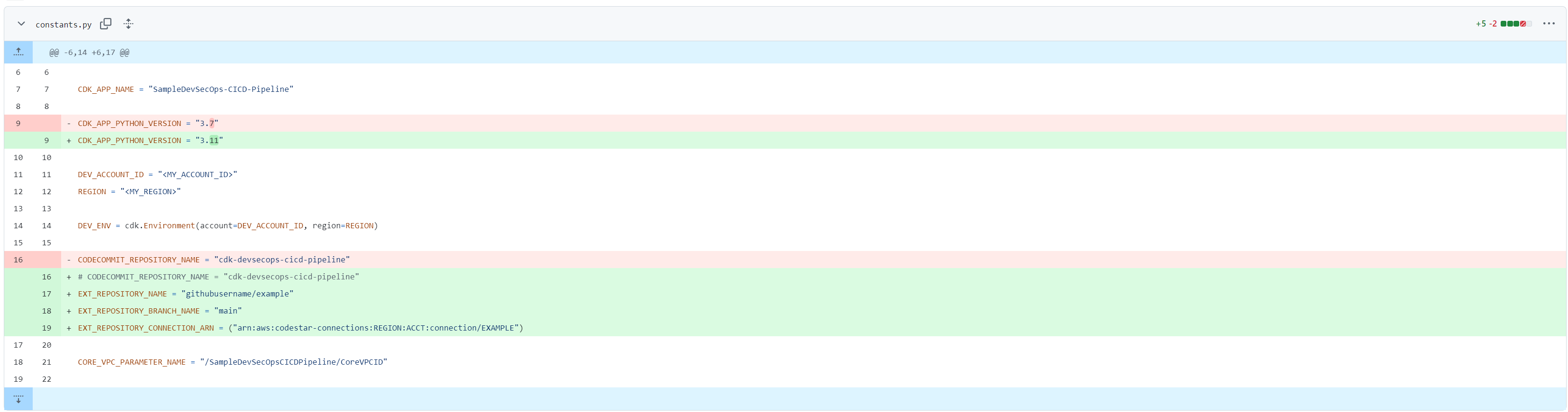
Reference the pipeline.py file (commit shown below) along with the constants.py file (also shown below), to see the pipeline is modified to use GitHub as the source repository instead of AWS CodeCommit. This was done by switching from the code_commit source to GitHub’s connection via AWS CodeStar Connections.
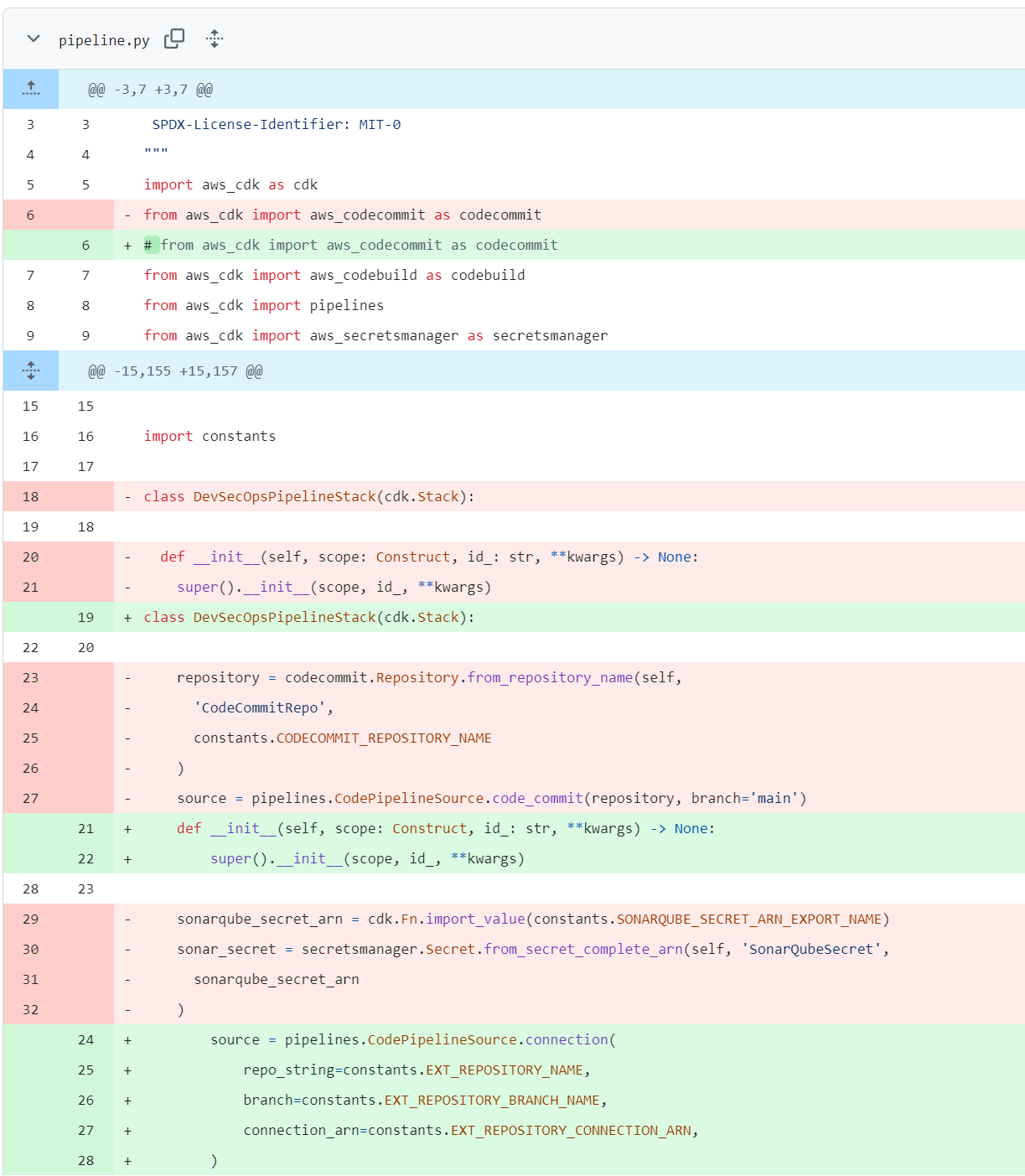
Before - pipeline.py:
        repository = codecommit.Repository.from_repository_name(self, 'CodeCommitRepo', constants.CODECOMMIT_REPOSITORY_NAME)
        source = pipelines.CodePipelineSource.code_commit(repository, branch='main')
After - pipeline.py:
        #repository = codecommit.Repository.from_repository_name(self, 'CodeCommitRepo', constants.CODECOMMIT_REPOSITORY_NAME)
        source = pipelines.CodePipelineSource.connection(
            repo_string=constants.EXT_REPOSITORY_NAME,
            branch=constants.EXT_REPOSITORY_BRANCH_NAME,
            connection_arn=constants.EXT_REPOSITORY_CONNECTION_ARN,
        )
We also need to specify the new variables, and be sure to comment out the previous CODECOMMIT_REPOSITORY_NAME:
Before: constants.py:
CODECOMMIT_REPOSITORY_NAME = "cdk-devsecops-cicd-pipeline"
After: constants.py:
        # CODECOMMIT_REPOSITORY_NAME = "cdk-devsecops-cicd-pipeline"
        EXT_REPOSITORY_NAME = "githubusername/example"
        EXT_REPOSITORY_BRANCH_NAME = "main"
        EXT_REPOSITORY_CONNECTION_ARN = ("arn:aws:codestar-connections:REGION:ACCT:connection/EXAMPLE")
In addition to this, we’ve bumped this repository to a new AWS-CDK version!
2. Upgrade to AWS CDK v2.160.0
We upgraded the AWS CDK version from 2.50.0 to 2.160.0, ensuring compatibility with the latest features and patches.
Before:
"aws-cdk": "2.50.0"
After:
"aws-cdk": "2.160.0"
This upgrade helps improve performance, adds new constructs, and keeps the pipeline up to date with the latest improvements.
3. Python Version Upgrade
We also updated the Python version from 3.7 to 3.11, ensuring better performance and security as well as access to the latest language features.
Before:
CDK_APP_PYTHON_VERSION = "3.7"
After:
CDK_APP_PYTHON_VERSION = "3.11"
Final Thoughts
Migrating the DevSecOps pipeline from AWS CodeCommit to GitHub was a necessary change, as AWS CodeCommit is now end of life. This provided an on-ramp via an aws-sample to utilize another supported SCM along with bumping the Python/AWS CDK version to support the latest features and runtime.