Using Hugo & AWS CodePipeline, CodeBuild, CloudFront & S3 to deploy a static site
- Troy Dieter
- Aws
- September 7, 2020
Table Of Contents
Retrospective: blog deployment model
Goal
Deploy a personal blog (in this case, troydieter.com) using the below requirements. I’ve used other deployment models, such as CI/CD pipelines – namely Jenkins to deploy static sites. Previous to the below approach, Ghost blog was used in conjunction with Nginx.
Requirements
- Initial infrastructure deployed using infrastructure as code.
- State is maintained in a remote provider.
- Low to nearly none operating costs.
- Optimized for fast delivery using a CDN.
Overview
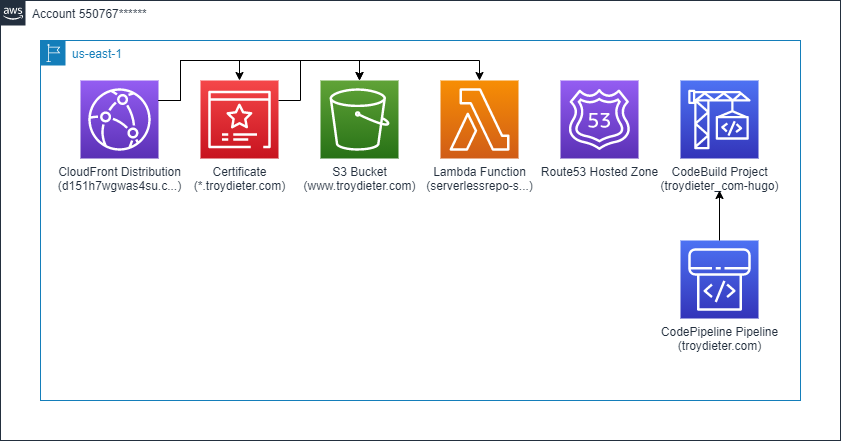
- Changes are written to the
static-content/content/postdirectory, committed and pushed to GitHub. - AWS CodePipeline uses GitHub webhooks to watch and start the pipeline on changes.
- AWS CodeBuild sources from the GitHub repository, installs Hugo and generates the static sites.
- AWS CodeBuild uses Hugo to push to the target and invalidates the CloudFront distribution for near-time effect.
- AWS SNS topic invocation, users are subscribed for success\failure of CodePipeline.
- Voila! Low operating cost, highly available and easy to use static site generation!
Costs
Costs are generally under $10/mo, deployed in the AWS us-east-1 region.
Tool manifest
Terraform - Infrastructure as Code
- Terraform v0.12.29 using the TF CloudFront S3 module deploys the following:
- AWS S3 Bucket to maintain the created static content, bucket policy only allowing traffic from CloudFront origin access identity
- AWS CloudFront distribution using the above AWS S3 bucket as an origin
- AWS CloudFront origin access identity to secure access
- AWS Amazon Certificate Manager, generated certificate for *.troydieter.com and a few other SAN’s
- AWS Route 53 public forward zone for troydieter.com
- AWS Route 53 DNS records for
wwwand theapexpointing to the CloudFront distribution - Lambda@Edge function to accommodate standard redirects
A Lambda@Edge function that implements standard web server redirects that simplify directory handling.
For example, requests for URI paths that end in “/” are rewritten into “/index.html” before the request is passed on to the CloudFront Origin. You may think of that as an “internal” redirect in webserver terms.
URI paths that end in “…/index.html” are redirected to “…/” with an HTTP status code 301 (Moved Permanently). This is the same as an “external” redirect by a webserver.
URI paths that do not have an extension and do not end with a “/” are redirected to the same path with an appended “/” with an HTTP status code 301 (Moved Permanently). This is again an “external” redirect. (This may hide actual content from the Origin, if you use paths without extensions!).
Hugo - Static Site Generator
- Hugo Static Site Generator v0.74.3-DA0437B4
- Hugo Clarity theme
AWS - CodePipeline
- AWS CodePipeline to source from GitHub using oAuth
- AWS CodeBuild using a standard v4.0 CodeBuild managed instance (Ubuntu)
The following buildspec.yml file is used:
version: 0.2

phases:
  install:
    commands:
      - echo Entered the install phase...
      - apt-get -qq update && apt-get -qq install curl
      - curl -s -L https://github.com/gohugoio/hugo/releases/download/v0.74.3/hugo_0.74.3_Linux-64bit.deb -o hugo.deb
      - dpkg -i hugo.deb
    finally:
      - echo Installation done
  build:
    commands:
      - echo Entered the build phase ...
      - echo Build started on `date`
      - cd $CODEBUILD_SRC_DIR
      - cd static-content
      - rm -f buildspec.yml && rm -f .git && rm -f README.md
      - hugo --quiet
      - hugo deploy --target=troydieter --quiet
    finally:
      - echo Finished building and Hugo-based deployment of troydieter.com
AWS - SNS
Example of success message when AWS CodePipeline completes:
{"account":"redacted","detailType":"CodePipeline Action Execution State Change","region":"us-east-1","source":"aws.codepipeline","time":"2020-09-07T18:39:04Z","notificationRuleArn":"arn:aws:codestar-notifications:us-east-1:redacted:notificationrule/9f53b458369ecdbdfdg39e86c3d0013dcc61d2c781","detail":{"pipeline":"[troydieter.com](http://troydieter.com/)","execution-id":"84da1222-420f-42e4-bd47-redacted","stage":"Build","action":"Build","state":"SUCCEEDED","region":"us-east-1","type":{"owner":"AWS","provider":"CodeBuild","category":"Build","version":"1"},"version":1.0},"resources":["arn:aws:codepipeline:us-east-1:redacted:[troydieter.com](http://troydieter.com/)"],"additionalAttributes":{}}